
Can an ATS Read Columns, Tables and Text Boxes? We Tested 7 Resume Layouts
Most advice about ATS and resume layout is a flat rule: no columns, no tables, no text boxes. We wanted to know which of those rules actually matter, so we tested them.
We wrote one resume for a fictional data analyst, Alex Morgan, and built it seven ways. Then we exported each version to a normal text-based PDF and pulled the text out with pdf.js, the same parser our free ATS resume checker uses. That text, in that order, is what an ATS has to work with before it decides where your name, jobs and skills are.
Two layouts came out scrambled and two lost information. The other three were fine, including two the usual advice tells you to avoid.
The results
| Layout | What the parser read |
|---|---|
| Single column | Correct order |
| Two columns, sidebar on the left | Correct, one column at a time |
| Two columns built from a table | Scrambled |
| Whole resume inside a table | Correct, row by row |
| Floating text boxes (Canva-style) | Scrambled |
| Icons instead of labels | Text kept, labels lost |
| Skill bars | Skill names kept, levels lost |
Two columns: it depends how they were built
A two-column resume with a sidebar read cleanly. The parser took the whole left column (name, contact details, skills, education), then the whole right column (summary, experience). Nothing got mixed.
The same design built as a table read very differently. Many Word templates fake two columns with a table, where each row holds one block on the left and one block on the right. The parser reads that row by row, so the sidebar gets cut into pieces and stitched into the work history:
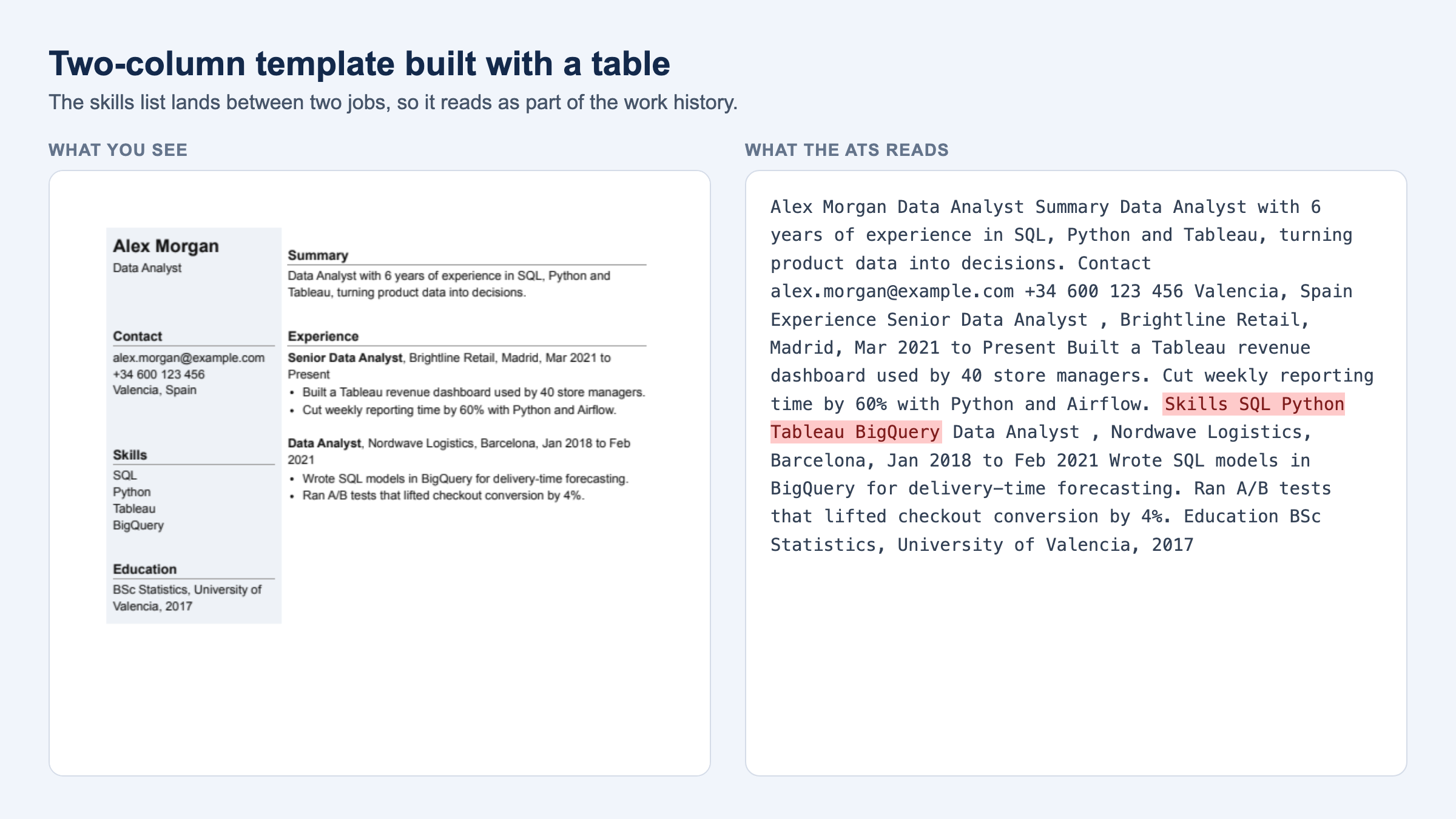
The skills list ended up between the two jobs: "...Cut weekly reporting time by 60% with Python and Airflow. Skills SQL Python Tableau BigQuery Data Analyst, Nordwave Logistics...". An ATS that maps text into fields can read that as part of a job entry. The summary also came out before the contact details.
What decides the result is how the template was built, and you can't tell that by looking at it.
Tables on their own were fine
A resume laid out entirely in a table, with section names on the left and content on the right, read in the right order. Each row stayed together.
That matches what recruiters see: plain tables rarely destroy the text. Some ATS map text into fields like "job title" and "employer", and content inside table cells is easier for them to misfile. Workday's own documentation says parsing results depend on resume format and the order of words. A table won't usually break your resume, but it gives the parser one more way to get it wrong.
Floating text boxes: the worst result
Design tools like Canva place each block of text as a separate box. On the page they look ordered. Inside the PDF, the boxes are stored in the order they were created.
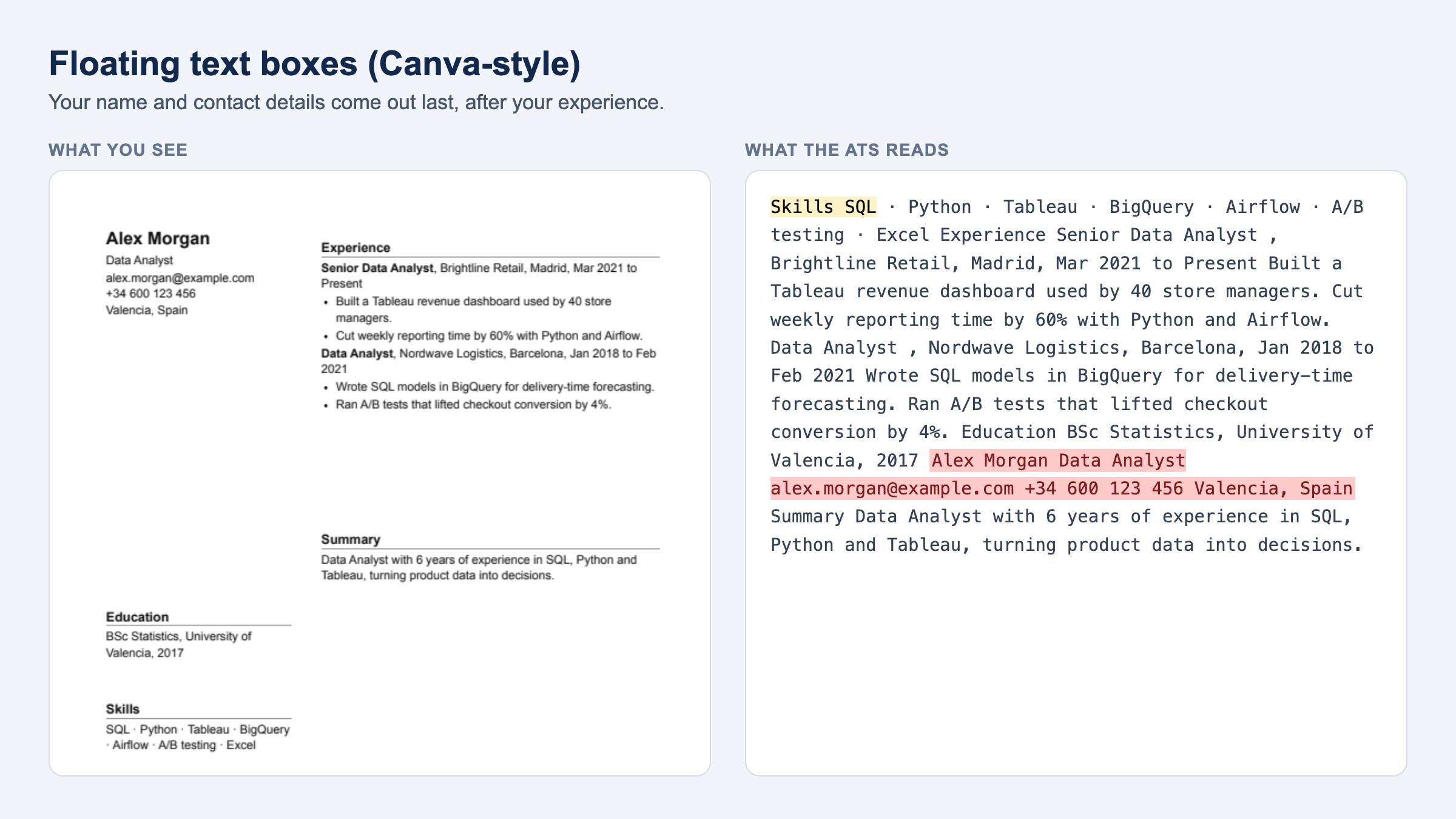
In our test the text started with "Skills" and ended with the name and contact details, after the whole work history. Most ATS look for your name and email near the top. Here they were at the very end, behind a job title that could easily be mistaken for a name.
This is one reason Canva resumes have a bad reputation with ATS. If you built yours in Canva, check it before you apply anywhere.
Icons and skill bars drop information
Icons next to your email, phone and city were harmless in our test because the values themselves were real text. What disappeared was the meaning of the icon. A phone icon is just a shape, so the parser never sees the word "phone". It gets worse when the icon is all there is: a LinkedIn logo with no written URL gives the ATS nothing.
Skill bars kept the skill names but dropped the levels completely. "Python ▰▰▰▰▱" came out as "Python". If your level matters, write it: "Python (advanced)". Better still, show it in a bullet point, like "Cut reporting time by 60% with Python and Airflow".
Headers and footers
We couldn't test this one fairly. In a PDF, text in the page header is ordinary text and our parser read it fine. The problem comes from ATS that skip the top and bottom margins of a page when they map fields. If your name and phone number sit only in the header, some systems won't pick them up. Keep contact details in the body of the page.
How to check your own resume
You don't need to know how your template was built. Look at what comes out:
- Upload your PDF to our free ATS resume checker and open What the ATS sees. It shows the extracted text in order, and you don't need an account.
- Read it top to bottom. Your name and contact details should come first, and every job title should sit next to its own dates and bullets.
- If sections are mixed up, switch to a single-column layout, or rebuild the two columns without a table.
A quick alternative: open your PDF, select all, copy, and paste into a plain text editor. It's rougher, but it shows the same thing.
For more on PDFs in general, including scanned and image-only files, see Does an ATS read PDF resumes?
Quick answers
Can an ATS read a two-column resume?
Often yes, if the columns were built as real columns or a sidebar. Not reliably if they were built from a table, which many Word templates do. Check the extracted text to know which one you have.
Can an ATS read tables in a resume?
In our test, a simple table kept its order. Tables still raise the risk of text being filed into the wrong field, so a plain layout is safer.
Can an ATS read text boxes?
Badly. Text boxes are stored in the order they were created, not the order you see. In our test the name came out last.
Are icons and skill bars bad for ATS?
They don't break parsing, but they carry no text. Write labels and levels as words.
Is a single-column resume the safest choice?
Yes. It's the only layout where the reading order can't come out different from the page.
Before your next application, see exactly what an ATS reads in your resume. It's free and takes a few seconds.
Looking for your next role? Join Hiretop's talent network and get matched with real jobs.