
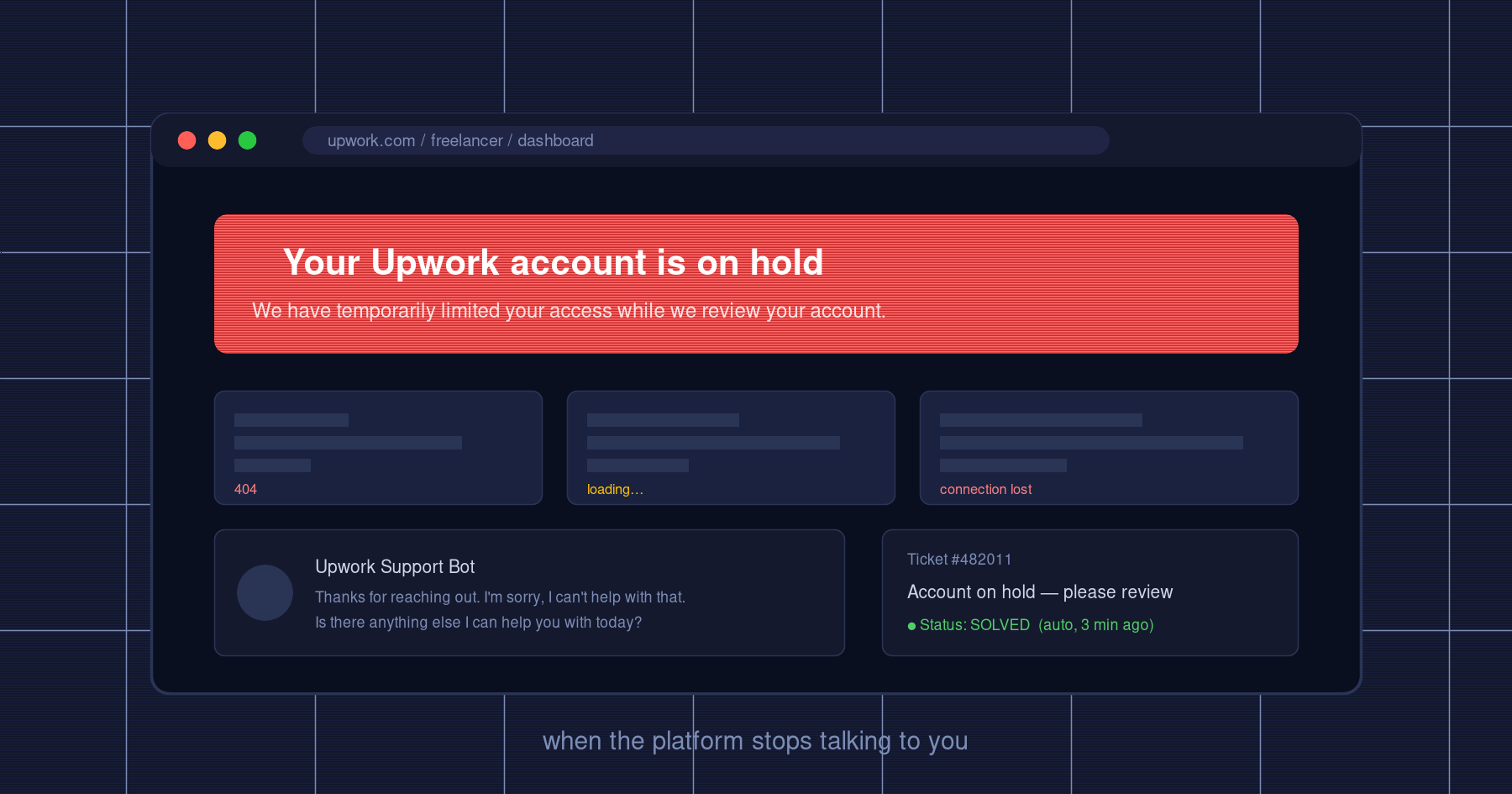
Your Upwork Account is on Hold
I've been freelancing on Upwork for a few years now and a couple weeks ago I woke up to that banner. No warning, no email beforehand, nothing. Just "your account is on hold" and a couple of broken buttons staring back at me.
It took me about two weeks to get unbanned. Along the way I picked up a bunch of stuff about how Upwork's review actually works that I haven't seen written down clearly anywhere, so I'm writing it down now while it's fresh.
This isn't a polished guide. It's just what happened, in the order it happened, and the rules I follow now so I don't end up there again.
Day 1, account goes weird
For the first 24 hours my account behaved like a broken cache. Project feed loads, then it doesn't. Contracts page works, then 404. Work diary disappears. Chats reset to "unread", and a few hours later all my message threads auto-cleared themselves, which freaked me out more than the ban itself if I'm honest. On the mobile app I was seeing a different state than the web. I figured it was a deploy bug on their side.
It wasn't. Looking back I think Upwork was busy revoking sessions and reshuffling permissions on my account in real time. If you ever see this glitch storm, stop touching things. Don't refresh, don't keep logging out and back in from different devices to "see if it's fixed". You'll just feed their fraud detector more weird signals.
My first instinct was to find a human. There isn't one.
I emailed support@upwork.com. Got an auto-reply telling me that inbox isn't monitored anymore. The ticket did show up in my support requests list though, then got marked Solved about three minutes later with no reply. Cool.
Opened the support chat. It's an AI bot. Three canned answers in rotation, you can practically see the routing logic. There's no "talk to a human" button when your account is on hold, even though that is obviously the moment you actually need one.
Checked email, push, in-app notifications. Nothing from Upwork explaining anything. This part matters: Upwork does not push the state of your case to you. You have to go look for it yourself.
Day 2, the appeal button (which 404s)
About a day in, a new button finally appeared inside the hold banner. Submit an appeal. Two free-text fields, no dropdown, no checklist of reasons. Just, here, explain yourself.
Honestly, I had no idea why I'd been banned. I hadn't done anything I knew was against TOS. So I went to read what other people had written, and the consensus from people who'd been through this was: volunteer one plausible explanation that Upwork already has a path for. The most common one is "I may have accidentally used a VPN." Upwork's anti-fraud stuff hates changing IPs and VPN is a story they already know how to process. So I wrote that. (I don't even know if it's true in my case. It might be. I have a VPN installed for other things.)
Hit submit. Clicked "view details" to see what would happen next.
I waited two days hoping it was a temporary thing. Page still broken. Tried opening another support ticket, same AI bot, same canned answers, no human.
What actually worked
This is the part nobody on the forums says clearly so I want to be explicit about it.
I stopped trying to escalate the ban. I opened a ticket about the 404 instead.
The AI bot will reflexively shove anything that smells like an appeal question back into the (broken) appeal flow. But a technical bug report goes somewhere else. I described the 404, attached screenshots, sent it. Got an acknowledgement. Looked at my ticket list, and the ticket they "opened" wasn't actually in there. So I filed it a second time, more screenshots. Two days later, both tickets suddenly appeared in my list, the page got fixed, and I could finally see what was waiting for me.
And what was waiting for me was this:
The instant I'd submitted the appeal, Upwork had silently created an identity verification request. With a 5-day deadline. If I missed it, the hold would auto-convert into a permanent ban.
No email about it. No push. No banner on the home page. No entry in the support tickets. Not in the mobile app either. It lived on exactly one deep-linked page, and that page had been 404ing for me for three days.
If you take one thing from this post, take this one. Most people who get permanently banned during a hold are not banned because their appeal failed. They're banned because they never saw the verification request and missed the timer. If your account is on hold and you submitted an appeal, just assume there's a hidden verification task with a countdown attached, and go hunt for it.
Verification round 1, documents
This round is boring. Government ID, proof of address, the usual KYC stuff. Anyone who has onboarded to a payment processor has done it. Not worth describing.
One thing worth flagging though. Upwork's UI "guarantees" a 48 hour response. Mine came back on day 3 or 4. Plan accordingly, because if they auto-decline because you missed their deadline while waiting for their response, that is somehow still on you.
Verification round 2, the video interview
After the documents came back ok, they asked for round two. Live video call with a real reviewer. Another deadline, 10 days. Have your ID, prepare to share your screen, book a slot.
The booking confirmation said the link would arrive by email.
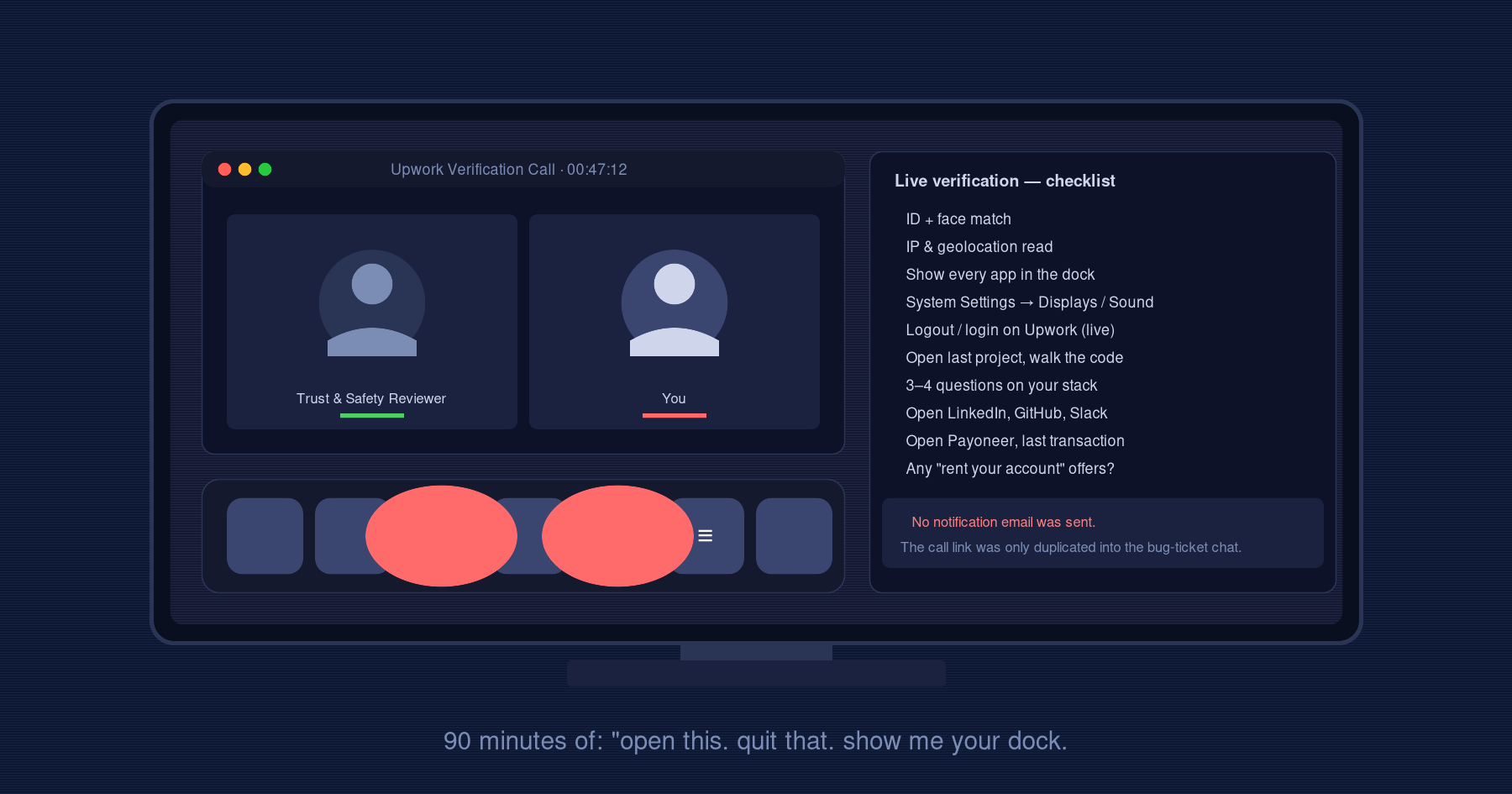
It didn't. The link never showed up in my inbox. I only got it because by this point I was paranoid and was also checking the chat thread on my bug-report ticket. They had duplicated it there. If I'd been relying on email like the UI literally told me to, I would have missed the call and that would have been the ban.
Check both channels. Always.
What the call actually looked like
I'd read other people's recaps before the call and none of them were really complete, so here's mine, in order, as close as I can remember it. The whole thing was about 90 minutes.
Identity and geolocation first. They check the ID against my face on camera. Then they send me a link to open in my own browser so they can read my IP and geolocation from my end.
Hardware sweep. This is where it stopped being a routine identity check and started being something else. "Please show me your dock. I want to see every app currently running." For each one — name, what it does, when did you last use it, please quit it. Anything they didn't like I had to close before we continued. Then, "Open System Settings. Show me Displays — any secondary monitors connected? Show me Sound — what audio drivers are installed?"
Their framing was that they were looking for screen-share, remote-control, or stream-redirect software. The reality is it's a full environment sweep on a personal machine, and I don't love it, but the alternative was a permanent ban so I complied. You can decide for yourself how you feel about it.
Live re-login. "Open your normal browser. Open Upwork. Log out. Log back in." They want to see that you have the password and that this is your actual session.
Tell us about yourself. Standard stuff. Services, stack, who you work for, how long you've been on the platform. Easy round.
Last project, deep dive. Here's where I sweated. "What was the last task you closed?" I blanked, it had been like two weeks, I couldn't remember. I asked to open Git to jog my memory. They let me. Then it was: "Show me that task in the project. Open the file. What is this class? What does this function do? Where is it called from? Show me the call site." Then three or four technical questions about my main framework. Not interview-hard. But not warm-up easy either, and I hadn't prepared for a tech interview. That's the point. They want to see if you can talk fluently about your own code from two weeks ago, with no warning. Someone running the account as a paid stand-in cannot.
Contracts and patterns. What contracts are active, when did I last submit work on each, what was the work. Then: what browsers do you use, why those, on what machines have you logged into Upwork, why, why did you stop using that one, from what locations. (Yes, all of it.)
Delegation. Do you ever pass tasks to a colleague? Do you give tasks to employees? Do you work as part of a team? Why do you have an agency profile in addition to your freelancer profile? Has anyone else ever used your account?
Identity surface. What's your primary email, do you have other ones, why, can you open them right now. LinkedIn — what email is it on, open it now, paste me the link in this chat. Same with GitHub. They saw Slack open on my desktop — "what email is Slack on, open it, show me the profile."
The "rent your account" question. This one stood out enough that I'm calling it out on its own. "Do you receive offers to rent out your account? If yes, show me the messages. Who wrote them, when, on which messenger? If anyone ever messages you with an offer like that in the future, you are obligated to report it."
That one question tells you what their fraud team is actually hunting. It's the account-rental black market — where someone with a verified freelancer profile rents it to someone in another country who actually does the work.
Money flow. "How do you withdraw funds? Open your Payoneer right now. What was the last transaction from Upwork — date, amount? What are these other transactions on Payoneer? Are you paying any subcontractors through it? Where does the money go after it lands?"
That was the whole call. About an hour and a half. The reviewer was professional and methodical and at no point did they tell me if I had passed.
Unblock
48 hours after the call I poked my support ticket again, because of course, no email. Reply said "your case is under review." Five days later, I learned from a client that my account was unbanned, because Upwork had let his message through to me. Still hadn't received a single proactive notification. Not by email, not in the app, not on mobile. Cool.
I logged in. Hold banner gone. Contracts live. Work diary tracking. Back in business.
What I think they're actually checking
Strip away the politeness and the whole process is hunting for five things, roughly:
- Hardware that shouldn't be there — screen-share software, remote-control tools, extra monitors set up for streaming the session to somebody else.
- Identity coherence across surfaces. Same person owns the email, the LinkedIn, the GitHub, the Slack, the Payoneer. And the login history on the work side roughly lines up with the login history on the money side.
- That you can actually do the job. Live skills check, no warning.
- That you actually did the recent work. Forensic walk through the last task, file by file.
- That you're not renting the account out.
The general structure of all this is what you'll see on the forums. The detail, and the hidden steps, are what trip people up. Every failure mode I hit — the 404, the missing email, the silent verification request, the support tickets that don't surface in your own list — would have ended in a permanent ban if I'd just trusted the system to tell me what to do.
The protocol I follow now
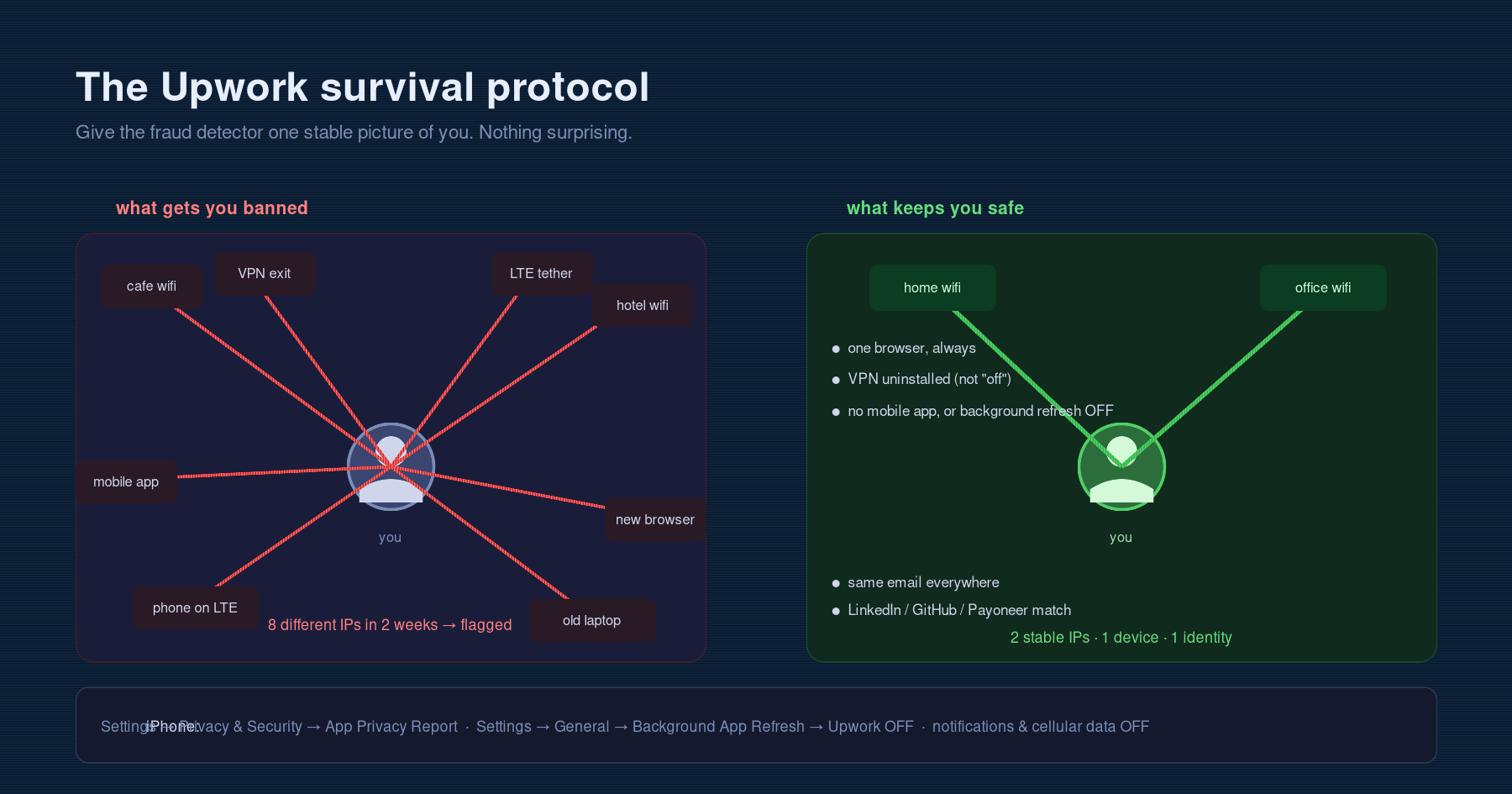
The fastest way to never have that conversation again is to make sure Upwork's fraud detector has nothing weird to look at when it scans you. Here's the rules I'm on now.
One working IP. Two max, both stable, both yours, both in the country your profile claims. That's it.
No mobile tethering. LTE rotates IPs every few minutes and every Upwork session over mobile is, from Upwork's point of view, a fresh and suspicious IP.
No café Wi-Fi. Different IP every time, plus shared NAT with strangers.
One browser. Don't log into Upwork from "a new browser just to test something." Pick one, stay there.
No VPN on the work machine. And not "I'll turn it off when I open Upwork." Uninstall it. When you're stressed on a deadline you will forget it's on. The only safe state is no VPN installed, period. This is, based on everything I've read and based on my own appeal text, the single most common cause of these holds.
Be careful with the mobile app. Even when you're not using it, the Upwork app pings home with your IP via the OS background-refresh mechanism. So if you carry your phone on LTE while your laptop is on home Wi-Fi, you're presenting two different IPs to Upwork at the same time, which looks like account sharing.
For iPhone
These are the settings I changed:
Settings → Privacy & Security → App Privacy Report— open this and look at Upwork's actual network activity. It's chatty.Settings → General → Background App Refresh— turn it off for Upwork.- Turn off notifications and cellular data for the Upwork app if you want to minimize background noise. Apple's own docs note that incoming notifications wake the device and can trigger background activity.
Or just delete the mobile app entirely. That's what I did.
Profile hygiene
If you have both a freelancer profile and an agency profile, know your story for why both exist. They will ask.
Never let anyone else log into your account. And if anyone DMs you offering to rent it, screenshot the message before you ignore them. Upwork will ask about this and being able to show you've already documented it earns trust.
Make sure your primary email, LinkedIn, GitHub and Payoneer all point at the same person. If those four don't line up, you have a problem waiting to happen.
Stuff worth reading
Two long-form posts that helped me understand what the platform is doing under the hood. Both worth reading in full:
- Upwork mobile app secret — https://dev.to/chocomastery/upwork-mobile-app-secret-4n7d
- Understanding Upwork's Security Systems: A Deep Technical Dive — https://dev.to/plzbugmenot/understanding-upworks-security-systems-a-deep-technical-dive-59p2
One last thing.
The hardest part of all this wasn't the ban itself, it was how isolating it was. No support agent on the other end. Chat is a bot. Emails bounce. Appeal page 404s. Your income is paused, your clients are confused, and the only signals you get from the platform are the absence of signals. It's a weird kind of helpless.
What got me through wasn't patience. It was being stubborn and using side channels. File the technical bug report instead of the appeal escalation. Poll the deep-linked pages every few hours. Check the support ticket chat as carefully as you check your email. Volunteer the VPN story in the appeal text. Show up to the video call rested, with a clean laptop, an empty dock, your Payoneer ready to open, and the code of your last task open in your editor.
And then tighten the protocol so the banner doesn't show up a second time.