
Is a Canva Resume ATS Friendly? What Breaks and How to Check Yours
An ATS can read a Canva resume if the PDF holds real text in a sensible order. Many Canva templates fail on the order, and you can't tell by looking at the design.
Canva is a design tool. Every heading, job and skill list sits in its own box that you can drag anywhere on the page. The templates look good because of that freedom, and most ATS problems with Canva come from it too.
What an ATS actually reads
An applicant tracking system doesn't see your layout. It pulls the text out of the PDF as one long string, then tries to work out which part is your name, which part is a job title and which part is a date.
That leaves two questions. First, is there text at all? Anything exported as an image is empty to the ATS. Second, what order does the text come out in? The ATS expects your name and contact details first, and each job title next to its own dates and bullets.
Canva resumes usually have real text. The order is where they go wrong.
Why Canva resumes come out scrambled
In a Word document, text flows from top to bottom. In Canva, each box is a separate object, and a PDF stores those objects in its own internal order. That order is often the order the boxes were created or layered, not the order you see on the page.
We tested this with a resume built from floating text boxes, the way Canva templates are built, and ran it through pdf.js, the parser our free ATS resume checker uses. The text started with "Skills" and the name and contact details came out last, after the whole work history.
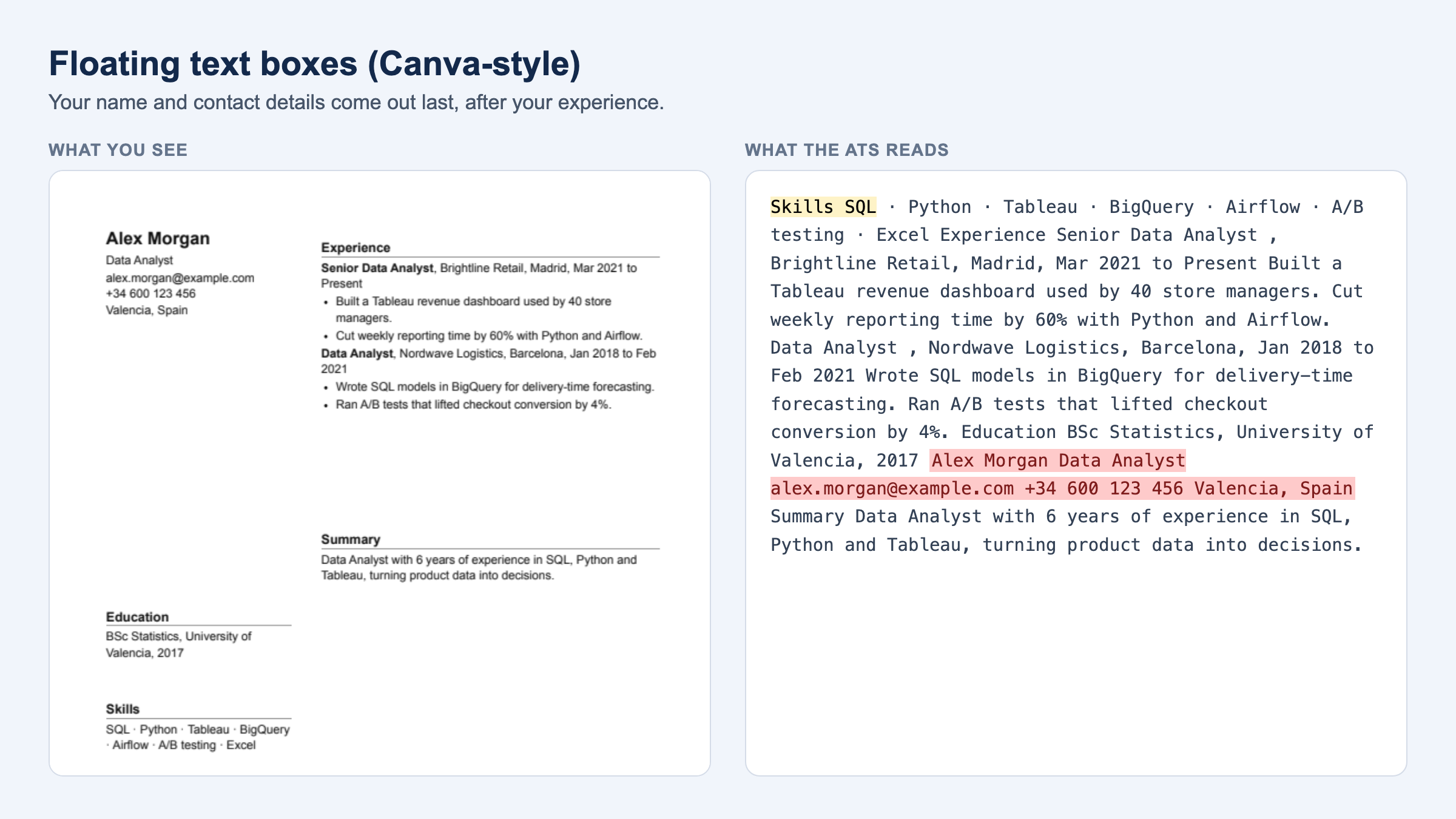
The page itself looked fine. In the extracted text, the resume opened with a skills list, and the line just before the name was a job title. An ATS that looks for a name near the top can pick the wrong one or leave the field empty.
The full test of seven layouts is in Can an ATS read columns, tables and text boxes?
That test copied the way Canva templates are built. It didn't use an actual Canva export. We're running real Canva PDFs through the same parser next and will add the results here.
Other things in Canva templates that lose information
Skill bars and dots
Many templates rate skills with bars, stars or circles. The parser keeps the skill name and drops the rating, so "Python ▰▰▰▰▱" becomes "Python". If the level matters, write it as a word.
Icons instead of labels
A phone or envelope icon is a shape. The number and email survive if they're typed next to it. A LinkedIn logo with no written URL gives the ATS nothing.
Text inside graphics
Text that is part of an image, a frame or a decorative element can export as a picture. If you can't select it in the final PDF, the ATS can't read it.
Contact details in a header strip
Some ATS skip the top and bottom margins of a page when they map fields. Keep your name, email and phone in the main body.
Photos
An ATS ignores a photo, so it does no harm to parsing. It does take space, and in the US and UK many recruiters prefer resumes without one.
Which Canva templates are safest
Pick templates that would still make sense if you printed them in black and white and read them top to bottom:
- One column, with sections stacked in reading order
- Section headings written as text: "Experience", "Skills", "Education"
- Dates typed next to each job, not placed in a separate column
- Skills as a plain list, without bars or ratings
- Contact details as text under your name
Two-column templates aren't automatically bad. A narrow sidebar with contact details and skills can parse fine, because the parser may read it as one block. The risk is a layout where small boxes from both columns sit side by side all the way down the page.
How to check your Canva resume in 2 minutes
You don't need to know how the template was built. Check the output:
- Download the resume from Canva as PDF Standard. Leave Flatten PDF unchecked.
- Open the PDF, press Ctrl+A or Cmd+A, copy, and paste into a plain text editor.
- Read it top to bottom. Your name and contact details should come first. Each job title should sit next to its company, dates and bullets. If anything is missing, it was exported as an image.
For a cleaner view, upload the PDF to our free ATS resume checker and open What the ATS sees. It shows the extracted text in order and checks it against a job description. No account needed.
How to fix a Canva resume that comes out wrong
If a few things are missing, retype them as plain text boxes, replace skill bars with words, and type out your LinkedIn URL.
If the order is wrong, try moving elements in Canva's layer order (Position → Layers) so they match the reading order, then export and check again. This doesn't always work, so test the result each time.
If the text comes out badly scrambled, switch to a one-column template, or copy the text into a simple Google Docs or Word file and export that as PDF.
Some people keep two versions: the Canva design to send directly to a hiring manager, and a plain version for online applications that go through an ATS.
Quick answers
Is Canva ATS friendly?
Some Canva resumes are, many aren't. It depends on the template and on how the text was placed. Check the extracted text before you apply.
Can an ATS read a Canva PDF?
Yes, if the text is real text and not part of an image. The common problem is the order the text comes out in, not whether it can be read.
Are Canva resumes bad?
No. They're risky for online applications because the layout can scramble the text. For a resume you hand to a person, a Canva design is fine.
Should I download my Canva resume as PDF or PNG?
PDF. A PNG or JPG is a picture, so most ATS will find no text in it.
Does Canva have ATS friendly templates?
Look for one-column templates with plain section headings and no skill bars. Then confirm with the copy-paste test, because a template's name or description doesn't tell you how it parses.
Before your next application, see exactly what an ATS reads in your Canva resume. It's free and takes a few seconds.
Looking for your next role? Join Hiretop's talent network and get matched with real jobs.